Customers

Everything about a customer on one recordEleven tabs laid out the way Comarch ERP XL users know — and a system that keeps the data correct.

Registration data, trade terms, limits, bank accounts, accounting settings, addresses, contacts, consents, attributes, notes and attachments. Sales, purchasing and accounting work on the same record — each on their own tab.

GeneralTradeCredit limitsSettlementsAccountingAddressesContactsConsentsAttributesNotesAttachments

What you get

Correct data from the first save

Polish NIP, REGON and PESEL numbers checked by check digit. A three-line name, customer kind (customer, bank, tax office, employee), supplier and recipient flags, sales agent with commission, forwarder.

Blocked customers are visible at once

“Transactions on hold” and “orders on hold” flags sit on the record and on the customer list — nobody misses that this company needs care.

Trade terms in one place

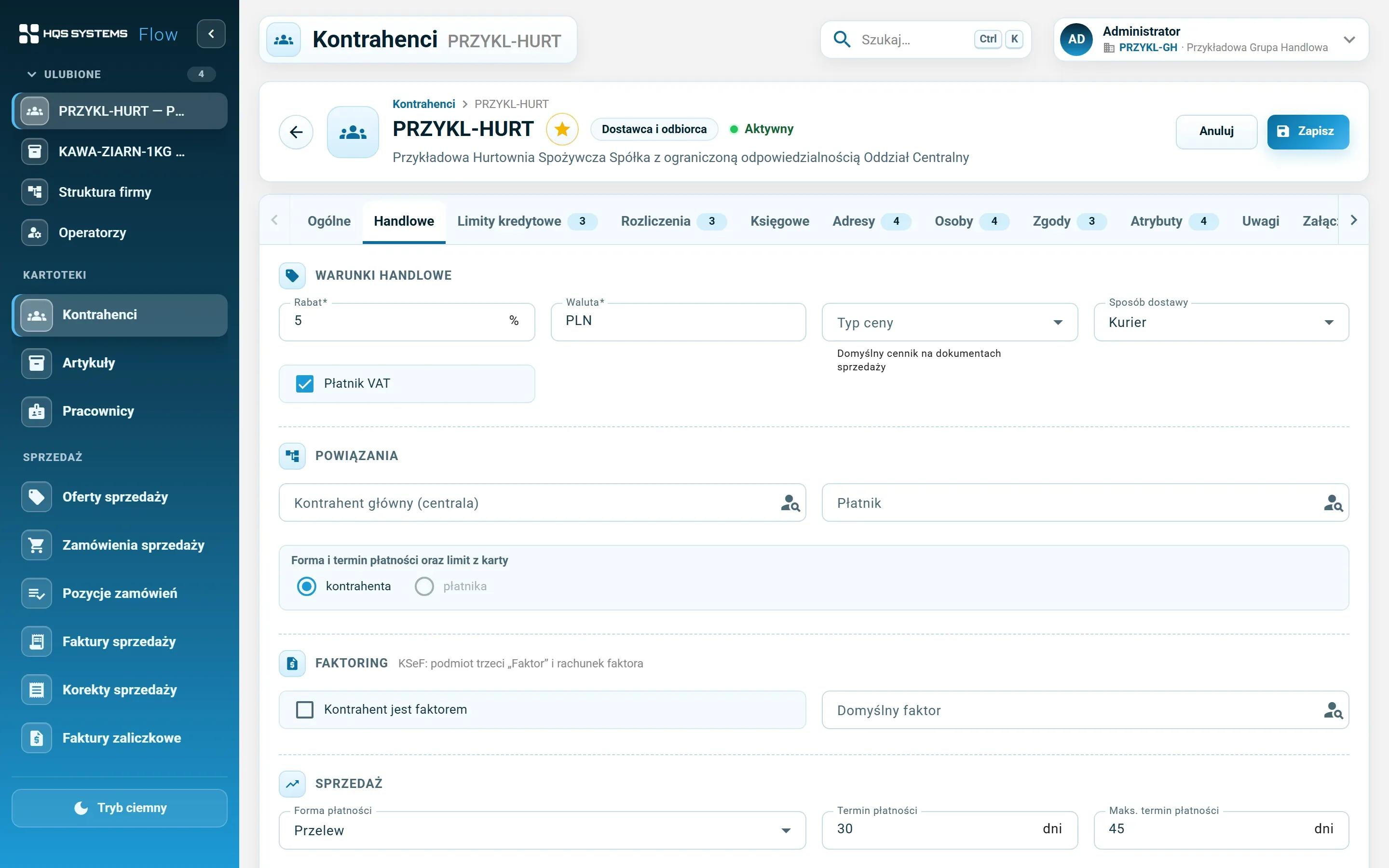
Payment method and term separately for sales and purchasing, maximum term, delivery method, discount, currency. Parent company (head office) and payer — terms can be taken from the payer's record.

Credit limits by period

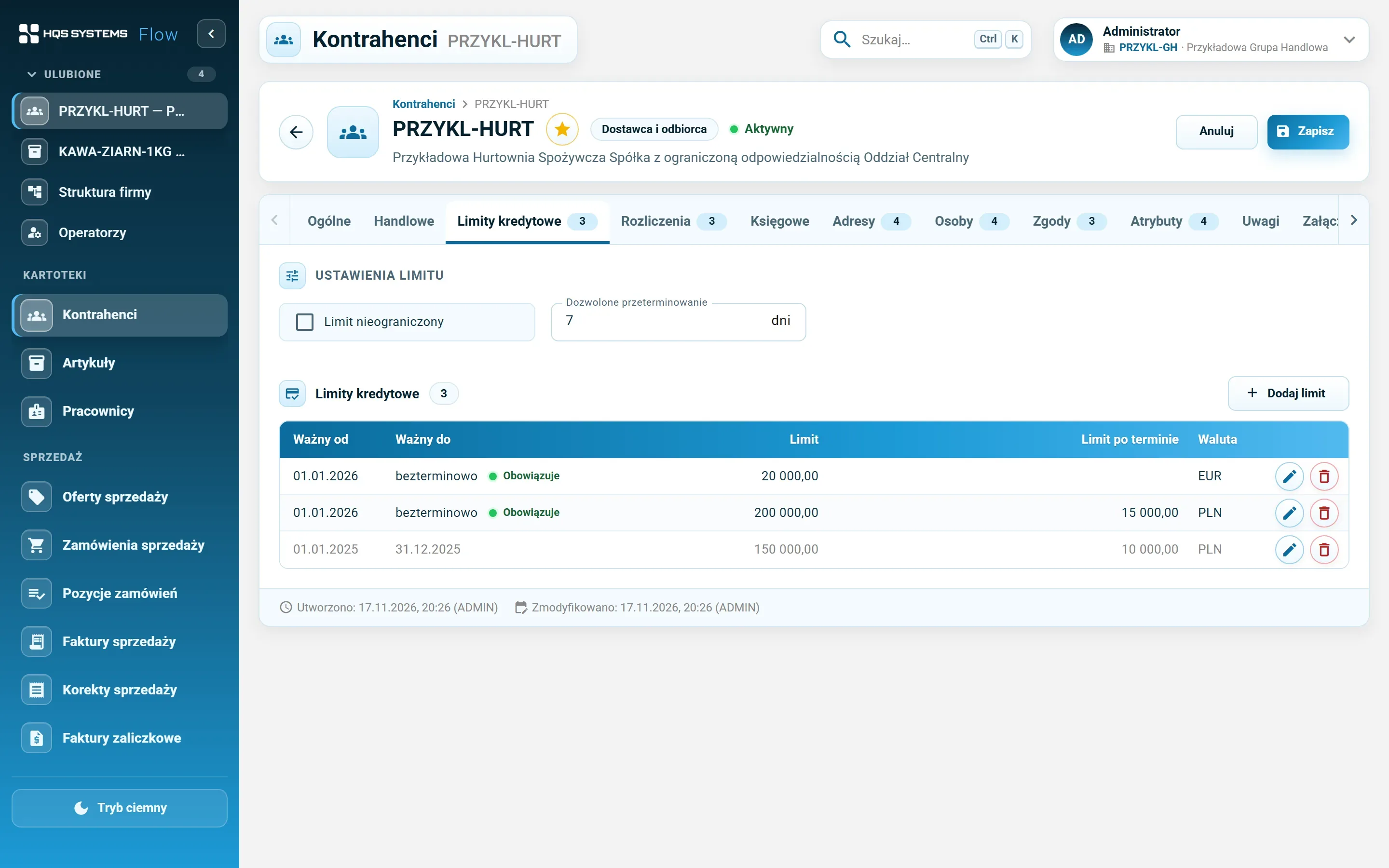
A limit amount and an overdue limit for chosen dates and currencies. The system won't let periods in the same currency overlap. Plus the number of days a payment may be overdue.

Bank accounts without typing bank names

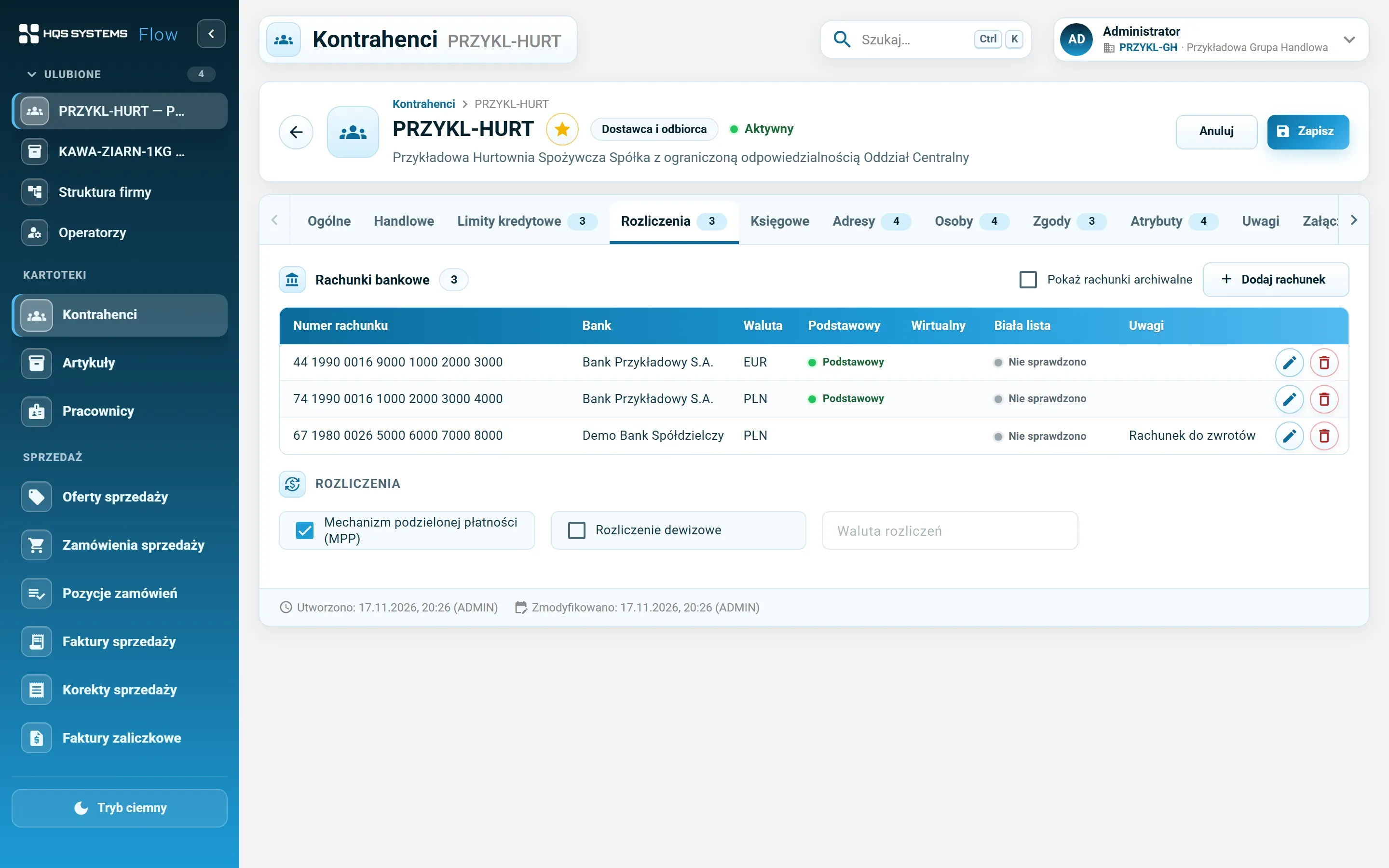
NRB/IBAN numbers verified by checksum, the bank recognised from the account number, one default account per currency. Split payment (MPP) and foreign-currency settlement marked on the record.

Accounting settings for KSeF and JPK

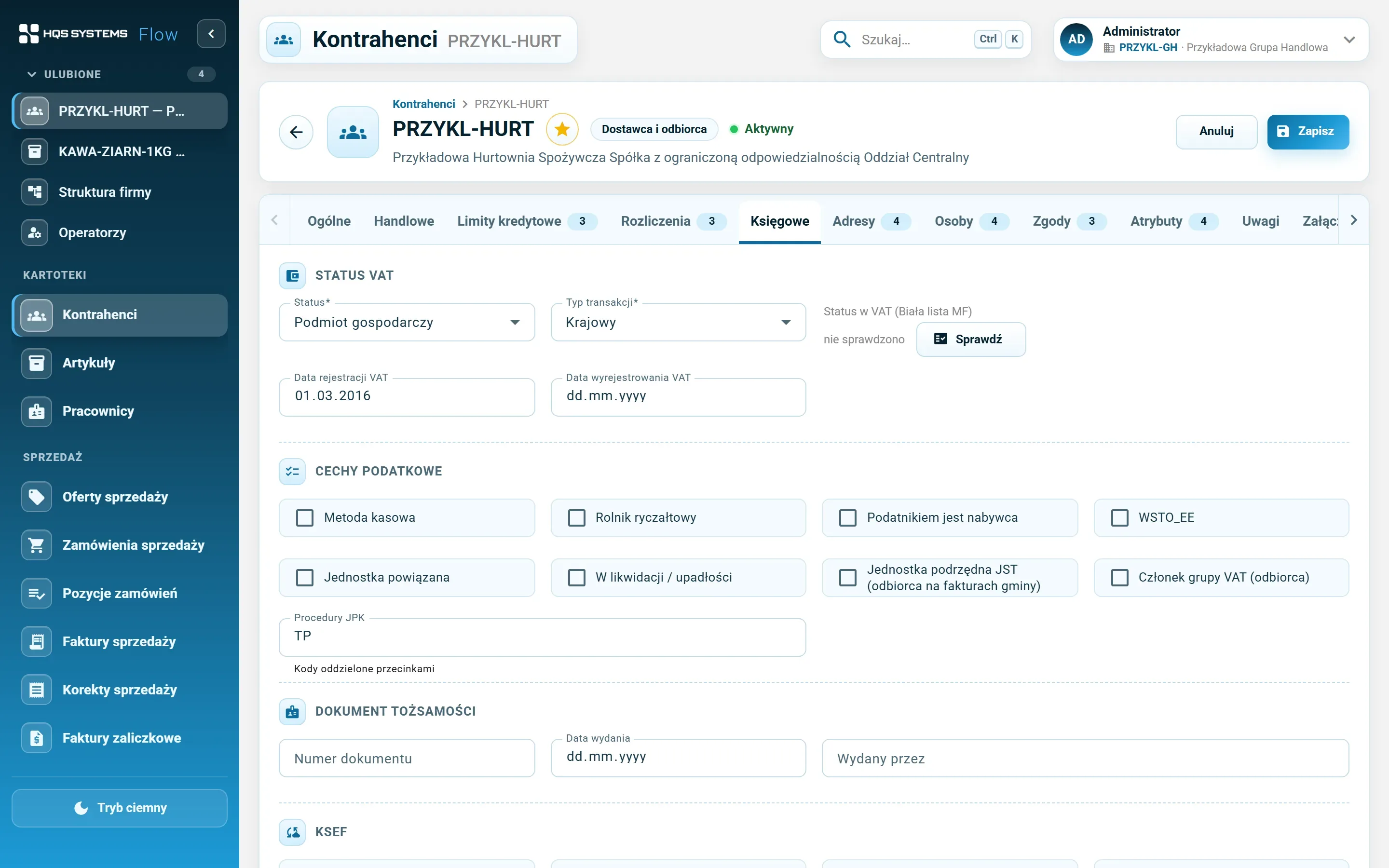
Domestic, EU or non-EU customer (checked against the country), cash accounting, reverse charge, related entity, VAT registration dates, JPK procedures and KSeF settings for sales and purchases.

The address has a history

Changing the main address closes the current version and creates a new one — the old one stays with its validity dates. A typo can be fixed without creating a version. Additional addresses — correspondence, delivery — alongside.

Contacts and consents at hand

Contact persons in a set order, with the invoice recipient marked. GDPR and marketing consents with version, grant and withdrawal dates, and a “valid on date” filter.

Screenshots from the working system

The customer record, tab by tab

The fictional customer “Przykładowa Hurtownia Spożywcza” on demo data.
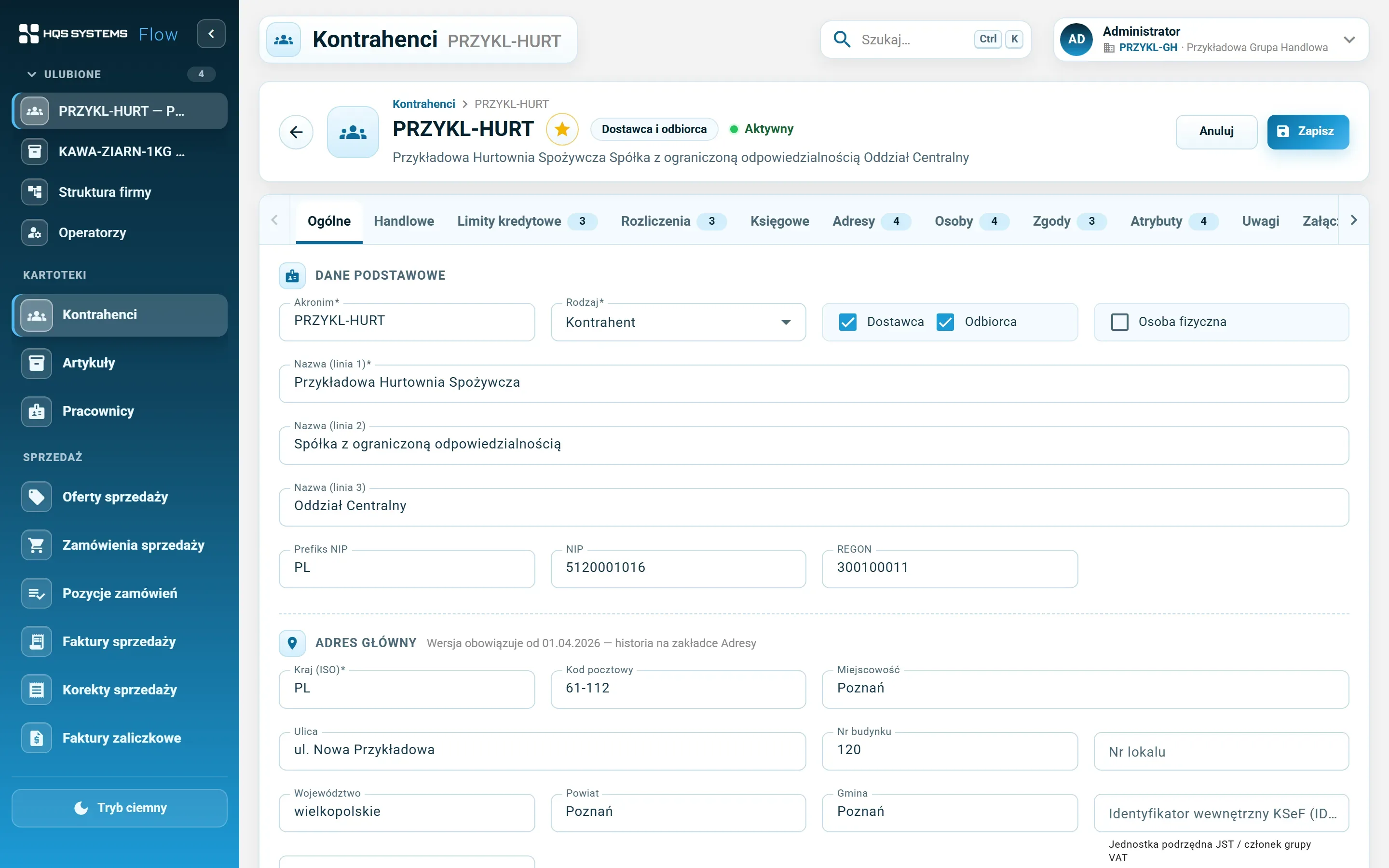
The General tab of a customer record — code, kind, supplier and recipient, three-line name, tax ID, REGON and main address
The General tab. A three-line name, tax ID with country prefix, REGON and the main address with the date it is valid from.
The Trade tab — discount, currency, delivery method, parent company, payer, and payment methods and terms for sales and purchases
Trade terms — separately for sales and purchasing, with parent company and payer.
The Credit limits tab — allowed overdue days and a table of limits with periods, amount, overdue limit and currency
Credit limits by period and currency. A limit that is no longer valid is greyed out.
The Settlements tab — bank accounts with recognised bank, currency and default flag, and the split payment option
Bank accounts. The bank recognised from the account number, a default account each for PLN and EUR, split payment marked on the record.
The Accounting tab — VAT status, transaction type, VAT registration dates, tax flags, JPK procedures and KSeF settings
Accounting settings — VAT status, tax flags, JPK procedures and KSeF.
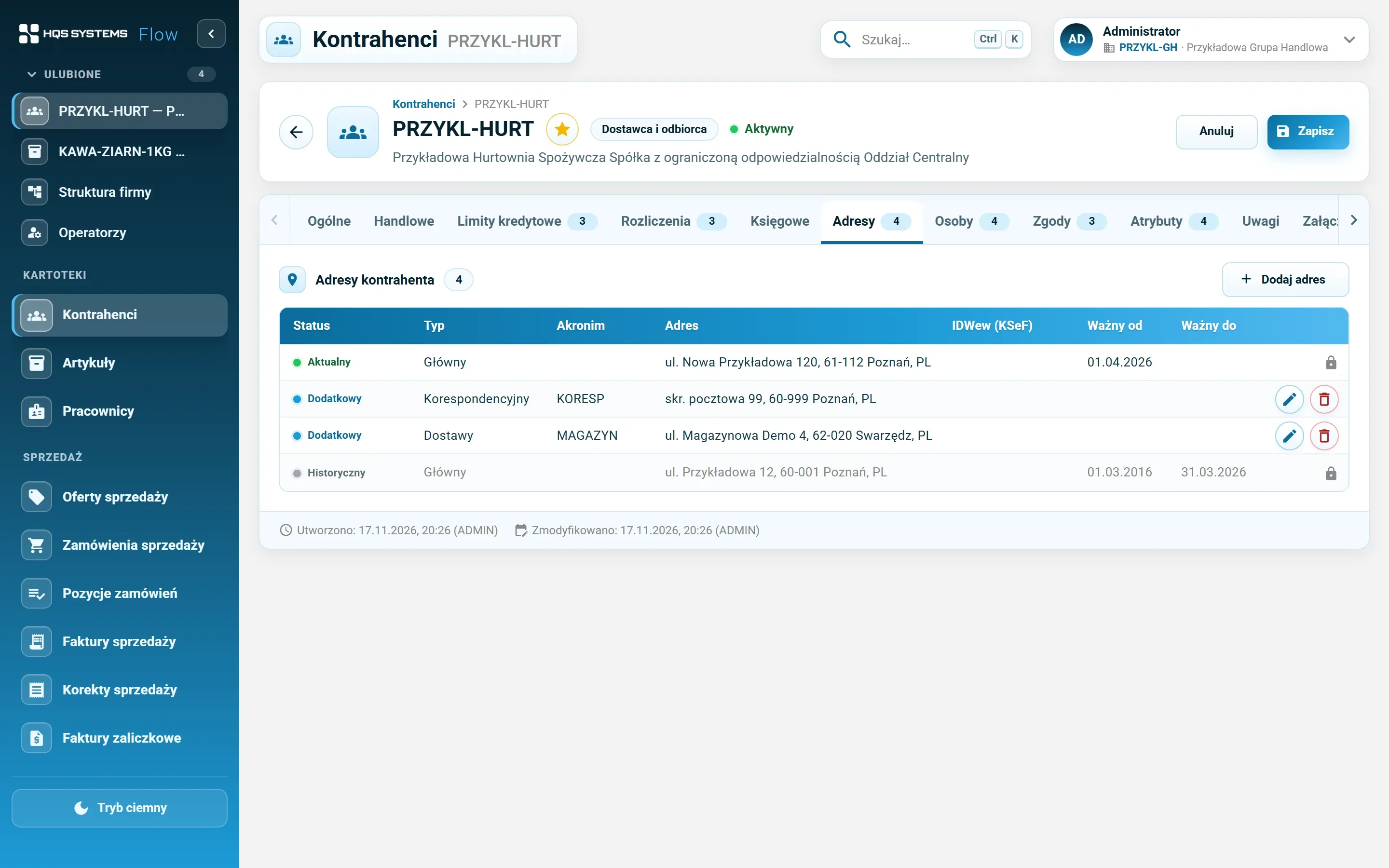
The Addresses tab — the current address, additional addresses and a historical address with validity dates
Current, additional and historical addresses. The historical version cannot be edited — it stays as it was.
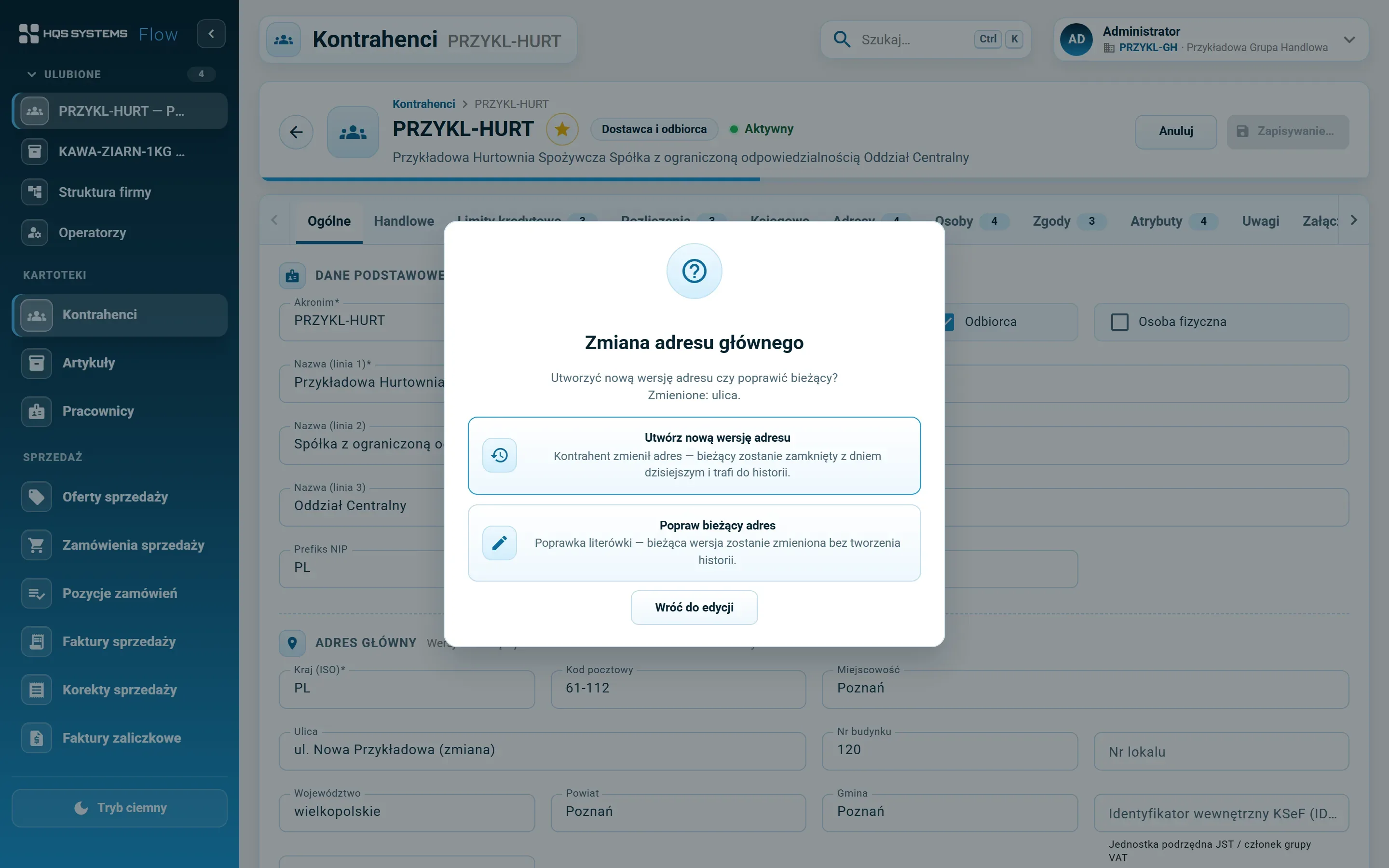
The dialog shown when the main address changes — create a new address version or correct the current one
When the address changes, the system asks whether the company moved (new version) or a typo is being fixed.
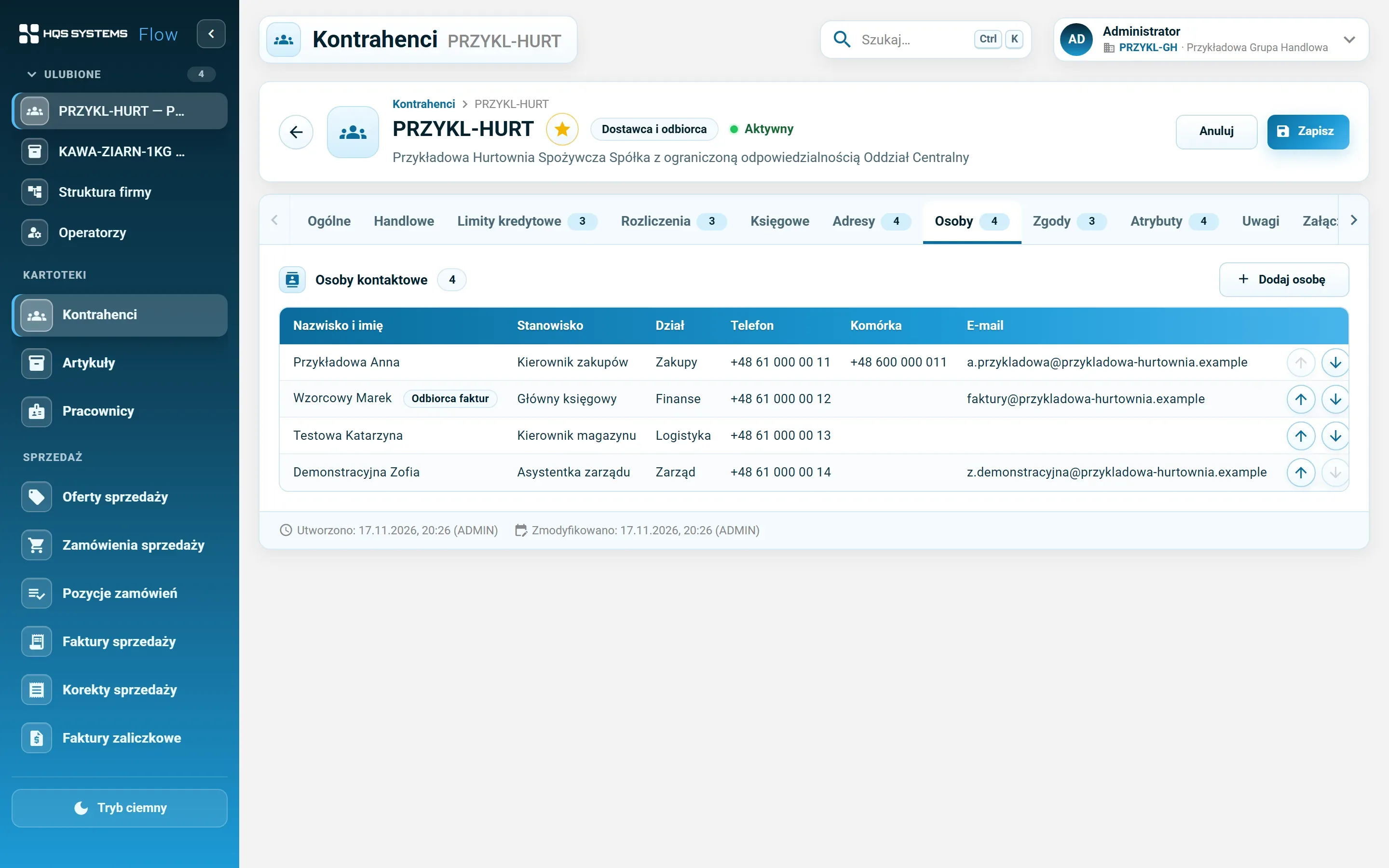
The Contacts tab — contact persons with position, department, phones, e-mail and invoice recipient flag
Contact persons in order, with the invoice recipient marked.
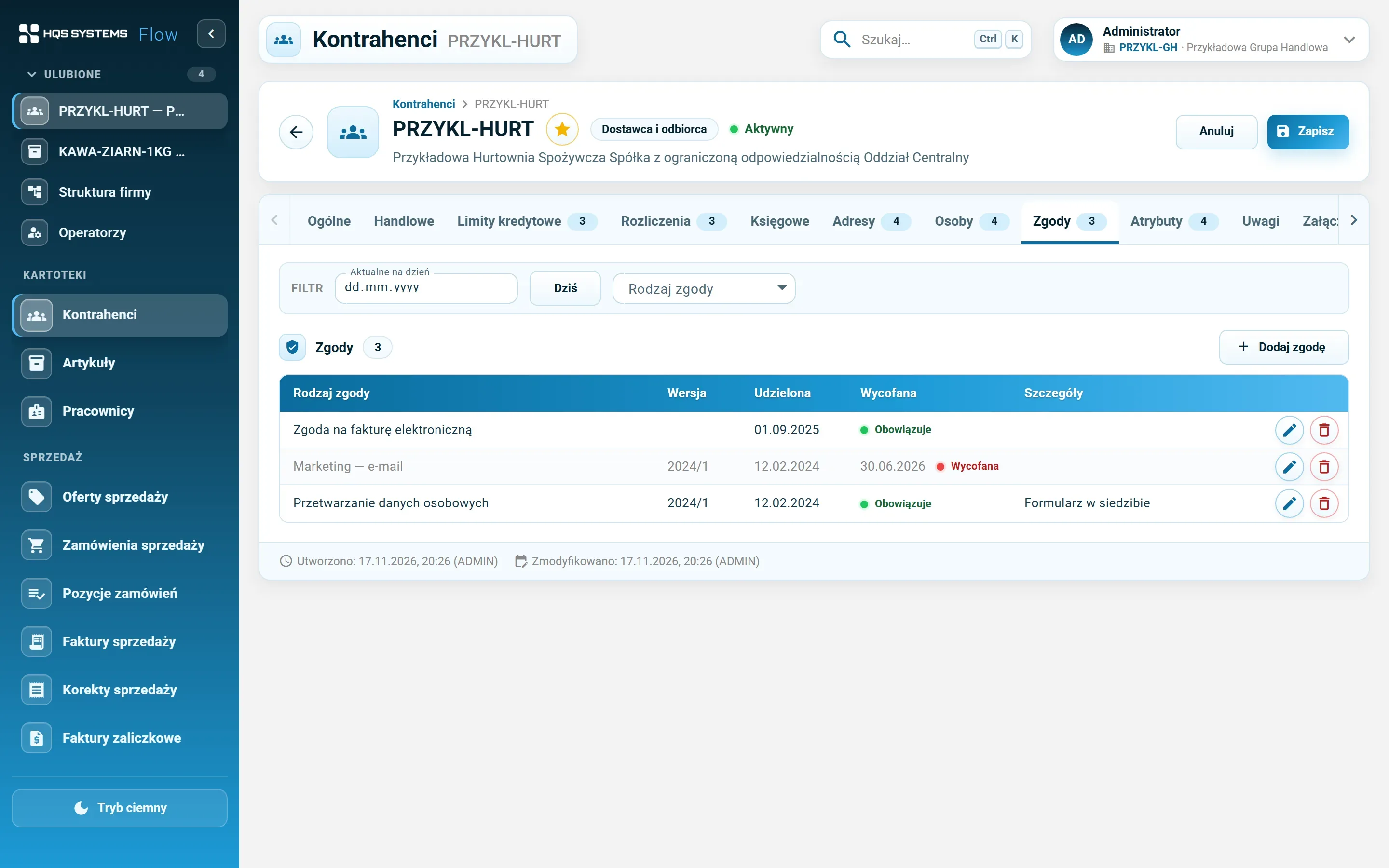
The Consents tab — a “valid on date” filter and consents with version, grant and withdrawal dates
Consents with version and dates. The “valid on date” filter shows the state of consents on a chosen day.
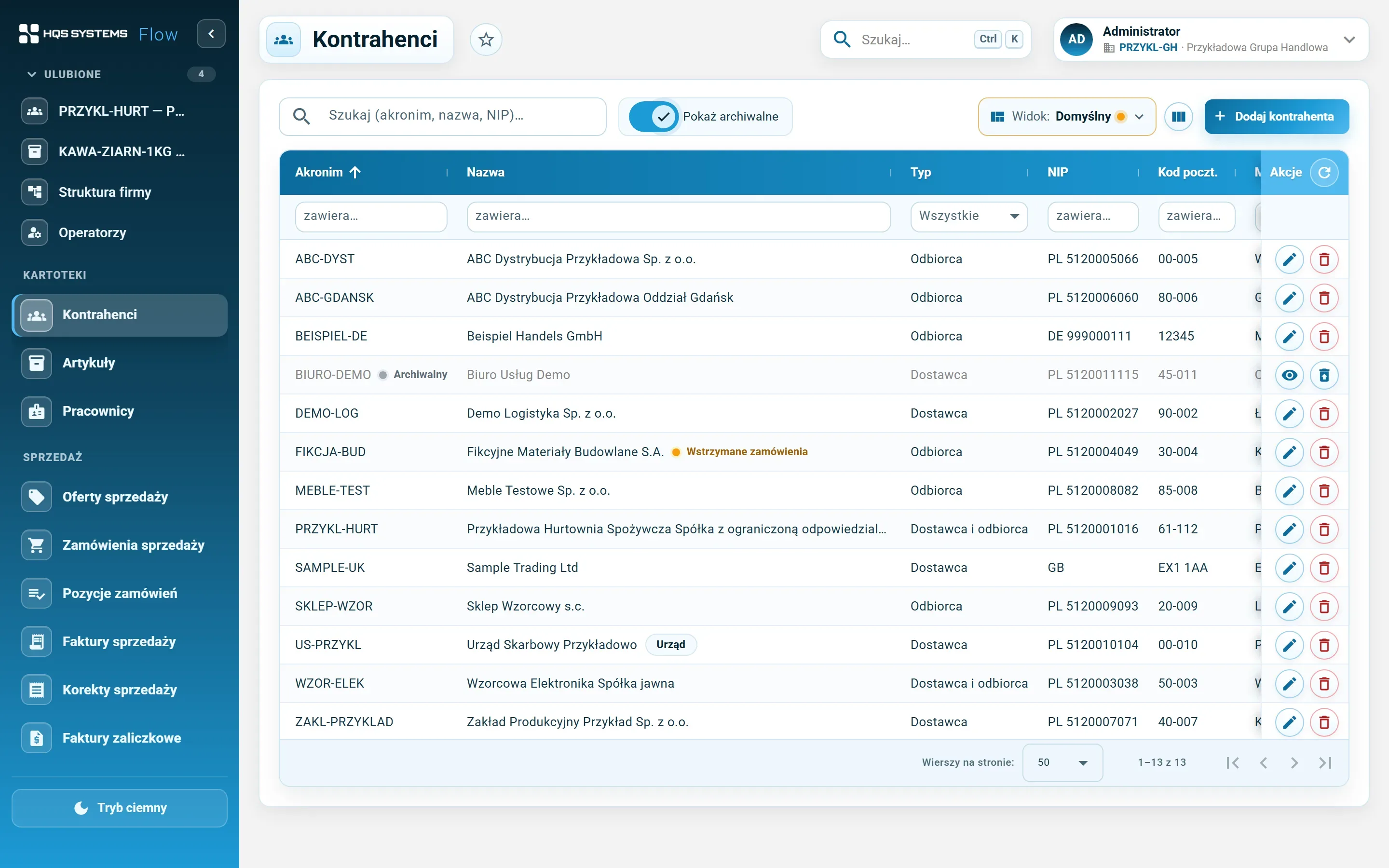
The customer list with archived records shown — an archived customer greyed out with a restore button
The list with archived records shown. An archived customer is greyed out and can be restored.

Click a screenshot to see it at full resolution. All data in the screenshots is fictional. The application interface is in Polish.

Duplicates under control

The same customer entered twice means double receivables and two different limits for one company. HQSFlow checks whether a tax ID is already in the database — including archived records. Whether a duplicate is blocked or only flagged with a warning is the administrator’s choice in the system settings. Customer codes are unique.

Deleting that doesn’t break anything

A customer that isn’t referenced anywhere can simply be deleted. If it is already linked — as an item’s manufacturer, another company’s payer, the owner of a barcode — HQSFlow moves it to the archive instead. The data stays, the list stays clean, and a mistake is undone with one click.

The data every department needs

  • Sales sees payment terms, discount, limit, and whether transactions are on hold.
  • Purchasing has its own payment methods and terms for the supplier.
  • Accounting gets the customer type (domestic, EU, non-EU), tax flags, JPK procedures, KSeF settings and accounts with split payment.
  • Administration keeps GDPR and marketing consents with their full history.

Fields the standard doesn’t cover can be added by the administrator as attributes — without programming. Contracts and other files go on the Attachments tab.

Let's talk about your company

Tell us how many companies, customers and items you have and what you use today. We will show HQSFlow on examples close to yours and tell you honestly what it already handles — and what it doesn't yet.

Book a demo

We answer every request personally, usually within one working day.

Please enter your name.
Please enter a valid e-mail address.
Please check the phone number or leave the field empty.
Please tell us briefly what the demo should cover.
How we handle your data

The controller of your data is HQS Systems. We use what you send here only to answer your request and to carry on the resulting conversation, and we keep it no longer than that requires. You can ask us at any time to show, correct or delete your data by writing to office@hqs.cloud.